



How to Optimize Your Remote Workspace for Maximum Productivity
Creating an effective remote workspace has become essential in today’s hybrid work environment. Whether you’re working from home full-time or a few days each week, the quality of your physical setup directly impacts your focus, efficiency, and overall well-being. Many remote workers struggle with distractions and poor ergonomics, leading to decreased productivity and increased fatigue. This guide walks you through proven strategies to transform your home office into a productivity powerhouse.
Assess Your Current Setup
Before making changes, take time to evaluate your existing workspace. Spend a full workday in your current setup and note which elements distract you or cause discomfort. Are you dealing with poor lighting, back pain from an unsuitable chair, or constant interruptions from household noise? Identifying these pain points is the first critical step toward meaningful improvement. Document what works well too—you’ll want to maintain those positive elements.
Invest in Ergonomic Furniture
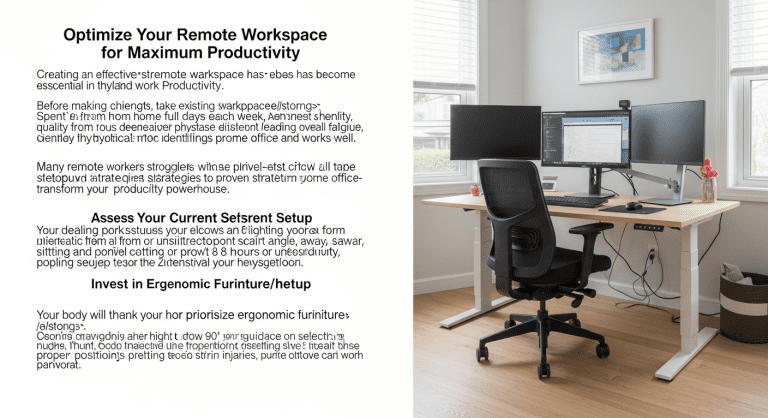
Your body will thank you for prioritizing ergonomic furniture. Start with a desk at the correct height—your elbows should form a 90-degree angle when typing. Your monitor should be positioned at eye level, about an arm’s length away from your body. A quality chair with proper lumbar support is essential; sitting for eight hours in an uncomfortable seat leads to chronic pain and reduced productivity. Don’t overlook your keyboard and mouse position—proper positioning prevents repetitive strain injuries that can sideline your work.
Control Lighting and Reduce Glare
Lighting dramatically affects both your mood and visual comfort. Position your desk perpendicular to windows when possible to minimize glare on your screen. Natural light boosts alertness and mood, but direct sunlight creates harsh reflections. Invest in adjustable task lighting—aim for a combination of ambient and focused light that matches your needs throughout the day. Proper lighting reduces eye strain and supports your circadian rhythm, helping you maintain energy levels from morning to evening.
Minimize Distractions and Noise
A quiet environment isn’t always possible, but you can control your soundscape. Use noise-canceling headphones or white noise machines to mask background sounds. If you share your home with others, establish clear boundaries about your working hours and create a visual signal indicating when you’re unavailable. Close doors, hang a “do not disturb” sign, and communicate your schedule to household members. Consider strategic placement of your desk away from high-traffic areas if your space allows.
Organize and Declutter
A cluttered workspace creates mental clutter. Keep your desk organized with essential items only within arm’s reach. Use drawer organizers, filing systems, and cable management solutions to maintain order. Every item on your desk should have a purpose—decorative elements are fine, but excessive clutter divides your attention. A clean, organized space reduces decision fatigue and helps your brain focus on meaningful work rather than visual chaos.
Establish Climate Control
Temperature significantly impacts concentration and comfort. Most people work best in temperatures between 69-72°F (20-22°C). If your workspace feels too warm or cold, productivity suffers. Adjust your thermostat, use a personal fan or space heater, or wear appropriate clothing layers to maintain optimal comfort. Poor temperature regulation causes fatigue and makes it harder to focus on complex tasks. Test different settings to find your ideal range.
Add Green Elements and Air Quality
Plants improve both air quality and mental well-being. They absorb carbon dioxide and release oxygen while also reducing stress and boosting mood. Low-maintenance plants like pothos, snake plants, or spider plants thrive in office environments. Beyond aesthetics, these living elements create a more pleasant atmosphere for spending eight hours daily. Consider adding an air purifier if you live in an area with poor air quality or have allergies—breathing clean air is fundamental to sustained focus.
Create Boundaries Between Work and Life
Your workspace should be separate from your relaxation area when possible. If you work from a bedroom or living room, use room dividers, screens, or even strategic furniture placement to create psychological separation. This physical boundary helps your brain shift between work and personal modes. When you can close a door or turn off visibility to your workspace, you’re more likely to mentally “leave work” at the end of the day. This separation is crucial for work-life balance.
Implement Personalization Carefully
While personalizing your space is important, maintain focus on functionality. Add a few meaningful items—a plant, a favorite photo, or inspiring quote—but avoid overdoing it. Your workspace should feel inviting yet professional. Personal touches boost morale without creating distraction. Strike a balance where your space reflects your personality while maintaining the focus required for deep work.
Test and Iterate
Workspace optimization is an ongoing process. After implementing changes, monitor your productivity and comfort for two weeks before making additional adjustments. What works for one person may not work for another, so personalization is key. Track which modifications have the biggest impact on your output and well-being. Be willing to experiment—sometimes small changes like adjusting monitor height or switching to a different chair can yield dramatic improvements in how you feel and perform.
By systematically addressing ergonomics, lighting, noise, organization, and comfort, you’ll create a workspace that supports sustained high performance. The investment in your remote environment pays dividends through increased focus, reduced fatigue, and better work quality.
“`


0 Comments